

As a frontend engineer, who desires perfection in every detail, UI/UX inconsistencies immediately stand out to me.
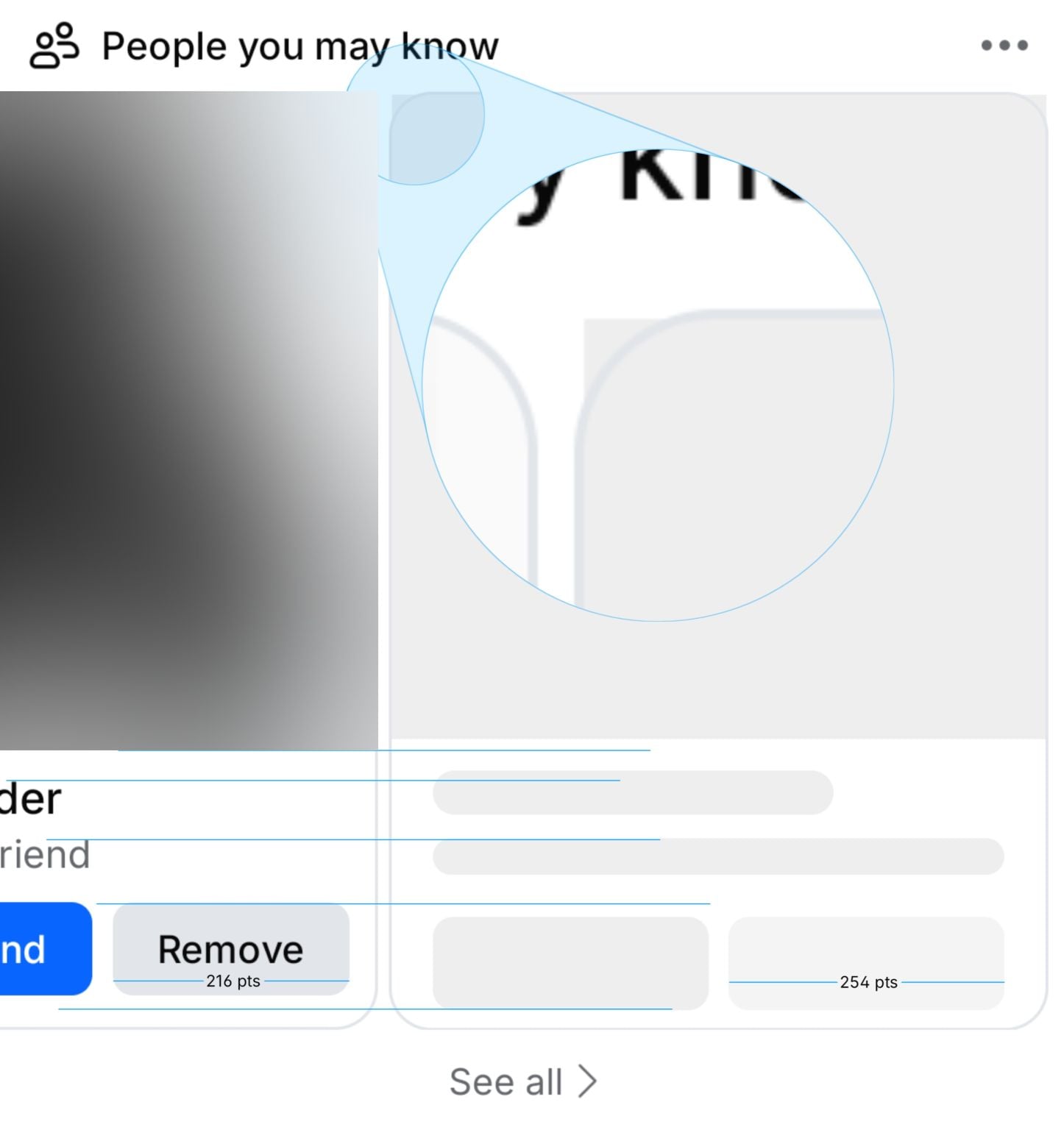
A few days ago, while scrolling through the Facebook app on a slightly slower internet connection, I noticed the People You May Know section loading. A skeleton screen appeared first, followed by the actual content. During that transition, the layout shifted slightly. The avatar size changed, the text alignment moved and the secondary button didn’t land exactly where the skeleton suggested it would (for example, the real button is 216 pts wide, while the skeleton was 254 pts).
This is a visible inconsistency between the skeleton layout and the final rendered UI.
This mismatch is subtle, but for detail-oriented users AND ESPECIALLY for people like me, it's noticeable and distracting.
The Problem
Skeleton screens are meant to create a sense of stability while data is loading. They visually promise that the layout you seeing now will remain the same once the content arrives. In this case, that promise was broken.
How Did This Happen?
Skeleton mismatches usually happen because they’re treated as an afterthought. Often, they’re built separately from the real components, so they don’t automatically reflect the actual layout. Developers sometimes hardcode widths and heights instead of deriving them from the live UI and the skeleton rarely shares the same spacing or structure as the real interface. On top of that, teams often prioritize speed over precision, assuming skeleton imperfections are GOOD ENOUGH.
At Facebook's scale, even tiny mismatches become systemic.
It feels unfinished.
How It Could Be Solved
This can be solved by integrating it directly into a single reusable card component rather than creating a separate component. The card should accept a loading or isSkeleton state and when this is true, skeleton elements are rendered inside the same layout as the real content.
<PeopleCard loading />
<PeopleCard loading={false} data={user} />